Same day service at your home or office
Author: Michael Podlabeniouk
-
Synology Cloud Sync repair Melbourne (Dropbox & Google Drive)
Our engineers recently noticed that an update to the Cloud Sync package on some of our customers Synlogy DiskStation’s caused their data to stop syncing to the cloud (Dropbox, Google Drive, etc…). Follow this Synology Cloud Sync repair Melbourne guide to get back in sync fast!
Affected Synology NAS (network accessible storage) devices include:
- Synology DiskStation DS215j 2-bay NAS
- Synology DiskStation DS415+ 4 – bay NAS
- Synology DiskStation DS416 Dual-Core 1.4Ghz 1GB 4 bay NAS Enclosure
- Synology DiskStation DS216+II NAS
As we aware of this and we note that your office may too be affected we recommend you check your Cloud Sync status if you are syncing data to the cloud.
You can do this by logging in to your DiskStation through your browser, Launch Cloud Sync from the top menu and check the History to see when the last time it uploaded your files.
We also recommend making this part of your weekly/monthly/quarterly regular system maintenance check as Synology updates are received almost weekly and could cause this to happen again.
If you are not comfortable checking yourself and would like us to step in we are more then happy to assist. Simply call us on 1300-694-877 or book online and we will get in touch with you!
Also we suggest running the latest package updates and DSM updates if automatic install is not configured.
We are your local IT support experts in Melbourne – available 7 days a week 8am – 8pm!
Check your Synology Cloud Sync repair Melbourne
Here is an example of how to check if your data is syncing correctly:
1. Log-in to your DiskStation on the web (i.e. https://diskstation:5000)
2. Open Cloud Sync from the top right corner of the web interface
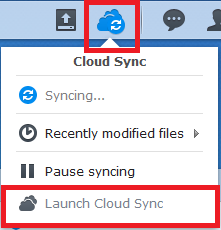
3. Once you have Launched Cloud Sync click the History Tab and you will see the date your files were last uploaded

You can also put a new file into your NAS and refresh the history to see if it syncs!
How to Re-link your Cloud Sync
Always create a backup of your current data to a USB device prior to unlinking or re-syncing and check your Hyper Backup app to see when it last backed up.
If you find that your data has not synced in some time you can re-link it.
Click the overview tab and select Manage then Unlink and reset the link for your Cloud Sync service.
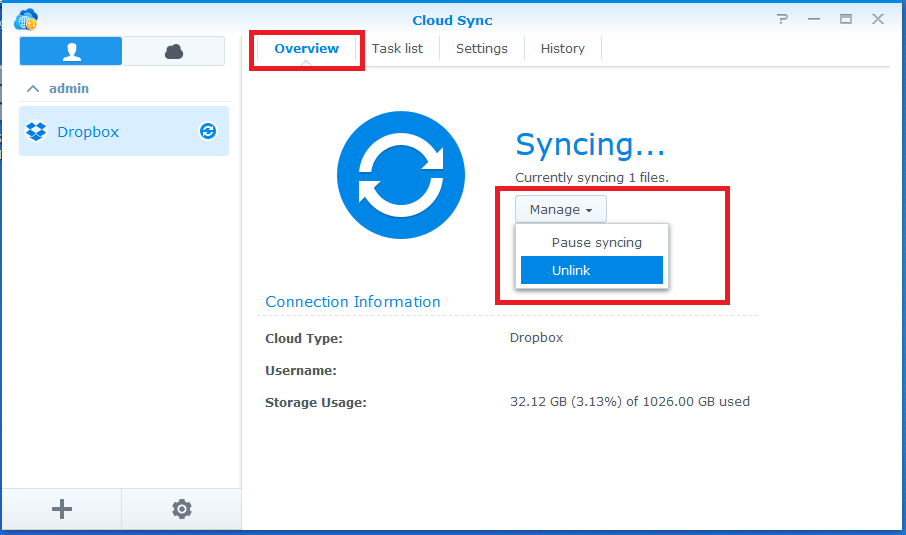
If you are not comfortable checking yourself and would like us to step in we are more then happy to assist.
We are your local IT support experts in Melbourne – available 7 days a week 8am – 8pm!
-
Upgrading to an SSD & boosting RAM
We are Melbourne’s SSD upgrade specialists! Do you want more performance and longer battery life out of your computer? Upgrade your desktop computer, laptop or Apple Mac today with an SSD and extra RAM. We will ensure that all your data is fully migrated to the new Solid State Drive. You will immediately notice a performance increase from the moment you push the power button!
Supercharge your computer today (SSD upgrade & RAM boost) in Melbourne
Solid State Drives (SSDs) are more affordable then ever and we can do the full upgrade in as little as 2hours. We can also install extra RAM for you as part of the upgrade. We are available 7-days a week to pick-up, upgrade and return your laptop or desktop computer. In most cases we can complete the upgrade the very same day so you wont be without your computer for long.
Here’s the proof of our work!
Watch this video and see how quickly the right computer boots up compared to the left computer. Infact after the SSD upgrade we did in Melbourne the IBM Lenovo Thinkpad was twice as fast! The IBM laptop on the right booted up 2 times in the time it took the regular HDD boot up once.
Key benefits of upgrading to SSD in Melbourne
- Faster boot-up times
- Programs open-up and perform faster
- Longer battery life due to lower power consumption
- SSDs are up to 10 x faster then HDDs
- Reduced likelihood of data loss
- Increased overall performance
Every device is upgradeable to SSD
- Apple MacBook Pro SSD upgrade Melbourne
- Toshiba laptop SSD upgrade Brighton
- Acer laptop HDD replacement service Cheltenham
- Windows desktop computer repair and upgrade Hampton
- HP ProBook laptop HDD upgrade to SSD Mentone
- Dell Inspiron upgrade service South Yarra
- Asus, Samsung, Sony, MSI and many other brands can also be upgraded in St Kilda
Don’t forget to add more RAM
Adding extra RAM into your computer will mean your computer can process more data at the same time. This will once again increase performance and mean you can have more things open at the same time!
Call 1300-694-877 today or book your SSD upgrade online in Melbourne.
Book your upgrade Call 1300-694-877
Same-day pick-up, upgrade and return within 24hours – upgrade today to enjoy the benefits